Where the Money Goes on a Power Bank Rental: The Revenue Split, Step by Step
JB Charging Team

On a $3 power bank rental, $2.40 goes to you and $0.60 goes to JB Charging. That's the whole power bank rental revenue split: no monthly fee, card fee or SIM bill comes out of your 80% on top. But $2.40 isn't what you keep. Any venue share comes out of it before it reaches your bank, and your own costs come out after.
Say a countertop station rents 60 times in a month at $5 a rental. Renters pay $300 and your 80% is $240. A 10% venue share takes $30, so $210 lands in your bank on the 1st. After $15 of assumed costs for replacement banks and fuel, you keep $195. If a station that cost you about $950 (one J8 Pro from a 5-pack, with shipping) kept that pace, it would be covered in about 5 months. At 2 rentals a month, it never would. Sixty is a round number for the arithmetic, not a forecast. The split is the same in both cases; the number of rentals is what you work on.
Below, we follow one rental from the tap to your bank, then walk through a made-up five-station month line by line.
Follow one rental through the power bank rental revenue split
- The renter pays. A guest taps a card or phone on the station's reader (Apple Pay, Google Pay or any contactless card) or scans the QR code. The payment runs through our processing, so card fees come out of our 20%, not your 80%.
- The meter runs at your price. You set it per station: per 30 minutes, per hour or per day, plus a daily maximum. The default is $3 per 30 minutes with a $20 daily maximum.
- The bank comes back and billing stops. Any free slot at any JB Charging station ends the rental. The renter pays for the time used, up to the daily maximum.
- It shows on your dashboard. You can watch your earnings build up in real time.
- On the 1st, you're paid. We keep 20%, any venue share comes out of your 80%, and the rest goes to your bank by direct deposit, with a statement in the portal's Billing tab. Set up your payment details in the portal before your first payout is due.
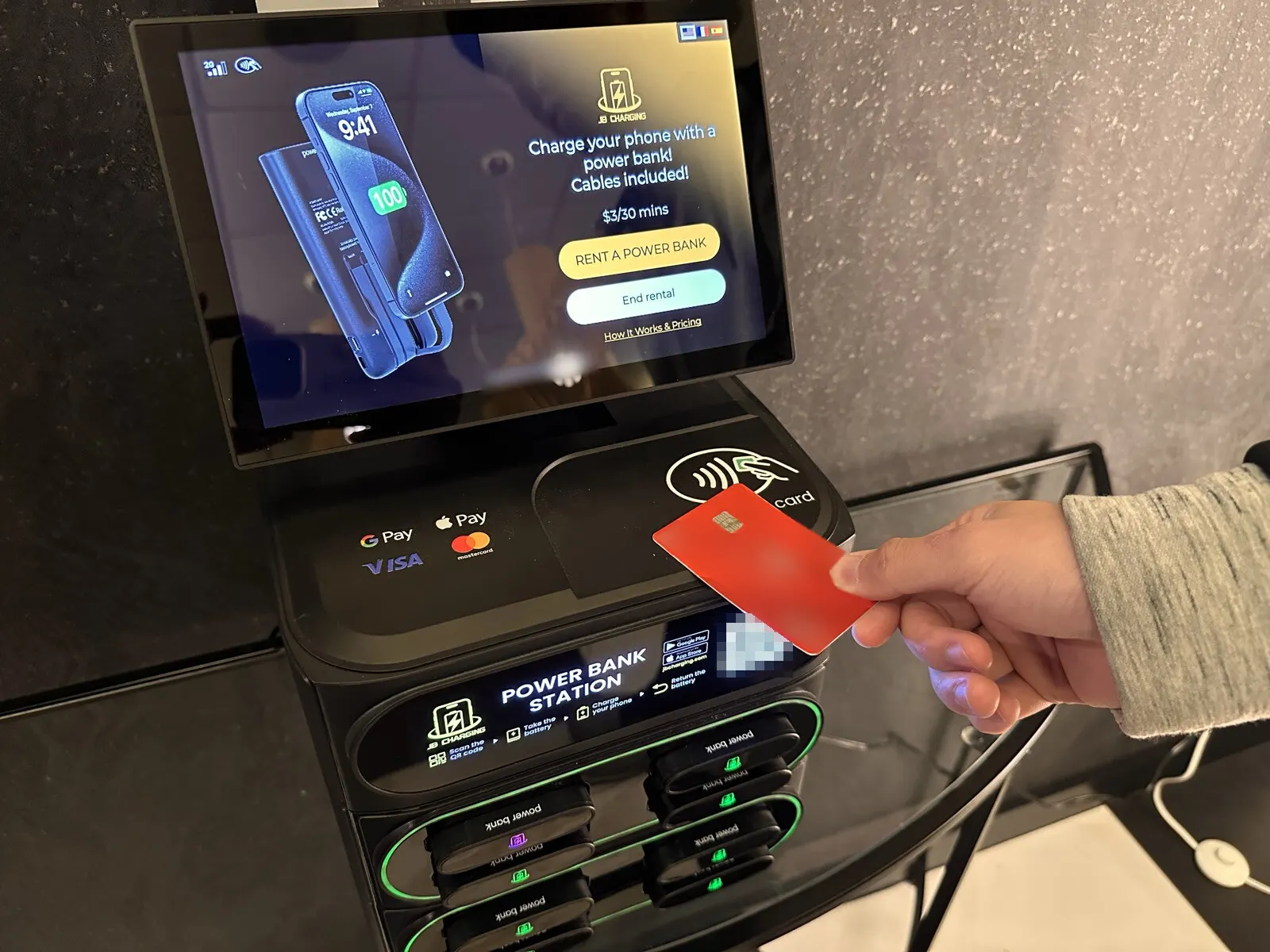
Here's the split on four hypothetical rentals. The venue share row assumes you agreed to give the venue 10% of what renters pay there. That's an example, not a standard rate, and many venues take nothing.
| One rental | 30 min at the default $3 | 2 hours at the default (four 30-minute blocks) | Kept all day (stops at the default $20 max) | 30 min at a custom $5 |
|---|---|---|---|---|
| Renter pays | $3.00 | $12.00 | $20.00 | $5.00 |
| JB Charging's 20% | $0.60 | $2.40 | $4.00 | $1.00 |
| Your 80% | $2.40 | $9.60 | $16.00 | $4.00 |
| Venue share (hypothetical 10%) | $0.30 | $1.20 | $2.00 | $0.50 |
| Yours, before your own costs | $2.10 | $8.40 | $14.00 | $3.50 |
Three things in that table are worth knowing before you set prices:
- How long a rental runs matters as much as the price. A two-hour rental at the default leaves you four times what a half hour does.
- The daily maximum is your ceiling too. At the default price, three hours is $18 and the next half hour hits the $20 maximum. In a bar open until 2am, a bank taken at 10pm stops earning a little after 1am. Where guests keep banks for hours, the maximum matters more than the per-30-minutes price.
- A free first period pays nobody. You can give each station up to 60 free minutes. A rental that ends inside that window earns nothing for you, us or the venue.
What JB Charging's 20% pays for
The 20% covers the machinery between the renter's card and your payout. Everything in the right-hand column is yours to pay for.
| Covered by JB Charging's 20% | Covered by you |
|---|---|
| Card and phone payment processing on the built-in reader | Any venue share you agree to |
| 4G connectivity: the SIM ships in the machine at no charge, with Wi-Fi as a backup | Replacement power banks, $200 per 10 at list price at the time of writing |
| The portal: pricing, screen uploads, rental tracking, alerts and payout statements | Stands or mounts, fuel and your time on the route |
| The renter app, and renter support through the machine, the app or the receipt | Your own business liability insurance; many venues, malls especially, ask for a certificate |
| Platform updates and support from our U.S.-based team | Taxes, and local maintenance at your venues |
There's no monthly fee, software subscription or SIM bill on top of the 20%. The line between the columns matters on a bad day. When a station drops offline or its card reader stops working, the portal flags it. Getting to the venue to fix the plug the cleaner knocked loose is on your side of the table.
Where a venue share comes in
Many venues host a station as a free amenity for their guests and take nothing. Others ask for a share of rental revenue, and you negotiate it. You set the cut per station in the portal and put it in the venue agreement you send from there. The share is paid to the venue monthly by direct deposit and appears as its own line on your statement.
Whatever you agree comes out of your 80%, never out of our 20%. If the venue's share is a percentage of what renters pay, your take is what renters pay times 80% minus the venue's percentage. No share: you keep 80%. 10%: you keep 70%. 20%: you keep 60%.
Turn a venue's ask into cents before you react to it. On a $3 rental, every 10 points of venue share costs you 30 cents. A venue that produces rentals at 20% beats one that produces none at 0%. How much revenue share to offer a venue covers setting the number.
A hypothetical month: five stations, one deposit
Price and venue share are set per station, so one deposit can add up very different stations. Here's a made-up month for five J8 Pro stations from the 5-pack: about $4,745 at list price at the time of writing, with the $245 shipping shown at checkout. Assume each rental brings in $5 and each station costs you $15 a month for replacement banks and fuel. That's deliberately low: no taxes, insurance or time. No ads are sold yet. The venue shares are examples, not standard rates.
| Station (hypothetical) | Rentals | Renters pay | JB Charging's 20% | Venue share | Your payout | After your $15 costs |
|---|---|---|---|---|---|---|
| 1: venue hosts free | 60 | $300 | −$60 | $0 | $240 | $225 |
| 2: venue takes 10% | 20 | $100 | −$20 | −$10 | $70 | $55 |
| 3: venue takes 25% | 20 | $100 | −$20 | −$25 | $55 | $40 |
| 4: venue hosts free | 8 | $40 | −$8 | $0 | $32 | $17 |
| 5: venue takes 10%, offline half the month | 2 | $10 | −$2 | −$1 | $7 | −$8 |
| Month total | 110 | $550 | −$110 | −$36 | $404, deposited on the 1st | $329, what you keep |
Revenue, profit and recovery of your investment are not guaranteed. Demand at a venue can be close to zero, and you may earn less than your costs or lose your investment.
Don't confuse the last two columns. Your payout is what we deposit. What you keep is the payout minus costs that never appear on our statement: banks, fuel, insurance, and the taxes you should set aside, because the 80% is before taxes.
- The venue you pick moves your deposit more than the share you give it. Stations 1 and 4 both pay their venues nothing, and station 1 adds $208 more to your payout. Station 3 gives its venue 15 more points than station 2, which costs you $15.
- One station can carry the month. Station 1 is more than half the payout. If every month looked like this one, the five stations would be covered in about 14 months. Put station 1 in a venue like station 4's instead, and you'd keep $121 that month, so covering the five would take about 39 months.
- A station can cost more than it brings in. Station 5 adds $7 to your payout against $15 of costs. At 2 rentals a month, a station never covers its cost. Venue choice, placement, pricing and keeping the station online and stocked are the levers that can change that.
How many rentals it takes to cover one station, from 2 a month to 60, is worked through in How much a phone charging kiosk can make.
Our revenue calculator shows only the top line: illustrative annual gross rentals, one total across all the machines you enter, at the weekly rentals and price you choose. To turn it into one station's monthly payout, divide by 12 and by the number of machines, then multiply by 80% minus the venue's percentage. Subtract your costs to get what you keep.
Checking your statement on the 1st
Each payout comes with a statement in the portal's Billing tab, showing gross rentals, the shares and your net. Using the month above, run four checks:
- Gross matches what your dashboard showed for the month ($550).
- Our line is 20% of gross ($110).
- The venue shares match the cuts you set for each station (station 3: 25% of $100 is $25; all five come to $36).
- Gross minus our 20% minus venue shares equals your deposit ($550 − $110 − $36 = $404).
If something doesn't match, email team@jbcharging.com with the station and the month. If the 1st passes with no deposit, check your payment details in the portal first.
Screen ad revenue: 100% yours
Everything on the screen besides the price and the rent button is ad space you control, and you upload ads to it remotely from the portal. You keep 100% of the ad revenue you sell; we take no share. You find the advertisers and negotiate the deals yourself, though, and there's no promise anyone buys. Whether a venue gets any of your ad money is between you and the venue, so put it in writing. Keep the ad line at $0 until someone signs. How to sell local ads on your screens walks through finding the first advertiser.
When a power bank doesn't come back: the non-return fee
By default, if a bank isn't back within 24 hours, the renter is charged a $40 non-return fee and keeps the bank. The venue is never charged. You can change both the window and the fee for each station.
How the fee is handled on your side, and any replacement coverage for lost banks, are set out in your distributor agreement. Read that clause before you buy, and contact support when a bank goes missing.
Either way, the slot is now empty. A replacement bank costs $20 at list price at the time of writing ($200 per 10). The portal's Active Rentals view shows every bank that's out and for how long, and the Non-returns card shows which ones didn't come back. Restock before the station runs short, because a station with no charged banks earns nothing. Lost power banks and non-returns covers keeping them rare.
Next step
Before you agree to any venue share, run it through the month table above and see what lands on the 1st. Then book a call, and we'll walk you through the split, the venue-share settings and the Billing tab with your own venues and prices, slow months included. Not ready for a call? Put your weekly rentals into the revenue calculator and work from its gross figure down to your payout.
Examples are illustrative only, not a forecast or a typical result. What a station earns depends on the venue, placement, pricing, local demand, and how actively you run it.
Frequently Asked Questions
How does the power bank rental revenue split work?
You keep 80% of every rental and JB Charging keeps 20%. On a $3 rental, $2.40 goes to you and $0.60 to JB Charging. Any venue share you agree to comes out of your 80% before you're paid. Your own costs, such as replacement power banks, fuel, insurance and taxes, come out after.
Do card processing fees come out of my 80%?
No. Payment processing on the built-in reader is part of JB Charging's 20%. So are 4G connectivity (the SIM ships in the machine at no charge, with Wi-Fi as a backup), the operator portal, the renter app and support. There's no monthly fee, software subscription or SIM bill on top.
Does the venue's share come out of my 80% or JB Charging's 20%?
Out of your 80%. Many venues host a station as a free amenity for their guests and take nothing. Others ask for a share of rental revenue, which you negotiate and set per station in the portal.
How does a venue's share show up on my payout?
Any venue share you agree to comes out of your 80% and shows as its own line on your payout statement in the portal's Billing tab. Venue shares are paid monthly by direct deposit. We'll walk you through how venue payouts are set up on a call.
When and how do operators get paid?
Monthly, on the 1st, by direct deposit. Each payout comes with a statement in the portal's Billing tab showing gross rentals, the shares and your net. Between payouts, you can watch your earnings build up on the dashboard in real time. Set up your payment details in the portal before your first payout is due.
What happens if a renter doesn't return a power bank?
By default, if a bank isn't back within 24 hours, the renter is charged a $40 non-return fee and keeps the bank. The venue is never charged. You can change both the window and the fee for each station. How the fee is handled on your side, and any replacement coverage for lost banks, are set out in your distributor agreement. You then restock the empty slot. Replacement banks list at $200 per 10 at the time of writing.

