Your First 30 Days as a Charging Station Operator
JB Charging Team

If you're working out how to start a charging station business (for phones, not EVs), here's the plan we'd follow. Line up venues while your order ships, test every station at home the day it lands, set up the portal that week, and place the rest over the next three. A station in a venue can earn. One in your spare room can't.
The target: by day 30 after delivery, every station you bought is in a venue, online, and has handled a test rental there. Locations aren't guaranteed, because each venue decides for itself. This plan gives every station its best shot.
The 30-day plan at a glance
| When | Focus | Done when |
|---|---|---|
| Before you order | Budget and fit | Budget set, with stands, spare banks and insurance · 10 target venues scouted · call booked |
| Before delivery | Venues | 20–30 venues listed per 5 stations · 2–3 verbal yeses with install days · stand venues chosen · insurance quote in hand |
| Days 1–2 | Hardware | Delivery checked · damage reported · every station online in your portal · a test rental from each, plus one by QR |
| Days 3–7 | Portal and first install | Payout details in · each yes added, agreement sent · price, staff code and screen set · first station live |
| Weeks 2–3 | Walk-ins and installs | Two walk-in blocks a week · agreement out the day of each yes · 4 of 5 placed, the last with a date |
| Week 4 | Review | Every station placed and online · each one sorted with the day-28 table · spare banks ordered |
How to start a charging station business: what to sort out before you order
A single J8 Pro lists at $1,199.99 plus $35 shipping. The five-station Essential bundle is $4,499.95 plus $245 shipping, about $950 a station delivered, with 5 lit headers, 2 display stands and 50 brochures. Those are list prices at the time of writing, with shipping as shown at checkout. There's no monthly fee: we keep 20% of each rental, which covers card processing, 4G, software and support.
Budget on top, at list prices, for extra stands ($150 each), spare power banks ($200 per 10), your own general liability insurance, gas, taxes, your time and any venue share. You find the venues; we give guidance and pitch materials. Ask about current delivery times on the call. Not sure about five? 1, 5 or 20 stations compares the cost per working station, including starting with one.
Why speed matters more than the bundle price
Same five stations, same price. What changes in the first six months is how fast they get out the door.
Say the Essential bundle costs about $4,745 delivered, and each placed station takes in $75 a month. Your 80% is $60; say the venue takes $10, leaving you $50. Many venues host for free as a guest amenity, and then the $10 stays with you. Count each station from the month after it's placed:
| How fast you place (hypothetical) | Each placed station leaves you, say | To you, months 1–6, before your own costs |
|---|---|---|
| All 5 by day 30 | 2 take in $125 with no venue share ($100 each to you), 3 at $50 | 5 months × $350 = $1,750 |
| All 5 by day 30 | $50 | 5 months × $250 = $1,250 |
| 3 by day 30, 2 more by day 90 | $50 | (3 × 5 + 2 × 3) months × $50 = $1,050 |
| 1 by day 30, 4 more by day 120 | $50 | (1 × 5 + 4 × 2) months × $50 = $650 |
| All 5 by day 30, rentals rare | $5 | 5 months × $25 = $125 |
Rows two and four end with the same hardware, venues and $50 a station. The $600 between them is only the wait, and it's about two-thirds of what one station in the bundle cost.
At row one's pace, the bundle is covered in about 14 months ($4,745 ÷ $350). At row two's, about 19. At row five's, about 190, more than 15 years. That's why week 4 matters: a station that barely rents needs fixing, then a relocation test, not patience.
Every figure here is before replacement banks, gas, maintenance, insurance, taxes and your time, so real timelines run longer. These figures are for easy arithmetic, not a prediction. Revenue isn't guaranteed; you may earn less than your costs or lose your investment.
Before delivery: build a list of 20–30 venues
A station that arrives to a yes can be installed that week; one that arrives to an empty calendar tends to sit.
List 20–30 venues for every 5 stations. Each venue decides for itself, and you'll hear "no" and "not yet" a lot. A long list means a run of no's doesn't stall you.
Choose by behavior, not category. Look for rooms where people stay a while, away from their own charger, and need their phone for tickets, payments or the ride home. In our experience, late-night bars, hotels, mall concourses and entertainment venues fit; gyms, offices, clinics and quick-turn restaurants rarely do for paid rentals. Check the spot, the outlet and your phone's signal on a busy night, as a customer.
Move every venue through the same stages: listed, visited, met the decision-maker, verbal yes, agreement sent, installed, live. Aim for 2–3 verbal yeses with install days written down before delivery. The venue pitch guide has the walk-in script and a full tracker.
Read the venue agreement before you pitch. Ask us for it on your call. Owners will ask how long it runs and how they get out.
Decide where the stands go. The Essential bundle has 2 stands for 5 stations, so pick now which two venues have no counter space.
Get liability insurance quoted. Malls, hotels, casinos, hospitals and campuses often want a certificate of insurance before a station goes in, and they mean your policy; JB's doesn't cover operators. A quote now keeps a COI request from stalling your best venue. See insurance and COIs for operators.
Days 1–2: unbox and test everything at home
Treat your living room as a test bench. Every problem you find here is one you won't find in front of a manager.
- Check what arrived against your order confirmation. Stations, stands and headers may ship separately, so check before assuming something's missing.
- Photograph any damage today. The 3-year limited warranty covers dead-on-arrival units and transit damage reported within 7 days. Email team@jbcharging.com with your order number and photos or video.
- Seat every power bank and plug in to a standard outlet.
- Confirm each station is online over its built-in 4G SIM, with Wi-Fi as the backup. If one won't connect or doesn't show up in your portal, contact us before it goes anywhere.
- Rent from every station. Tap your own card or phone, take a bank and return it. Back within 30 minutes at the default price, a $3 test sends $2.40 back to you in your payout. Do one more through the QR code in the JB Charging app, on any one station, so you know both paths work. With 10 or 20 stations, test in batches of five.
- Check the portal. Each test rental should appear, and each station should show how many charged banks it holds.
- Photograph a working station. It's your pitch material until your first install.
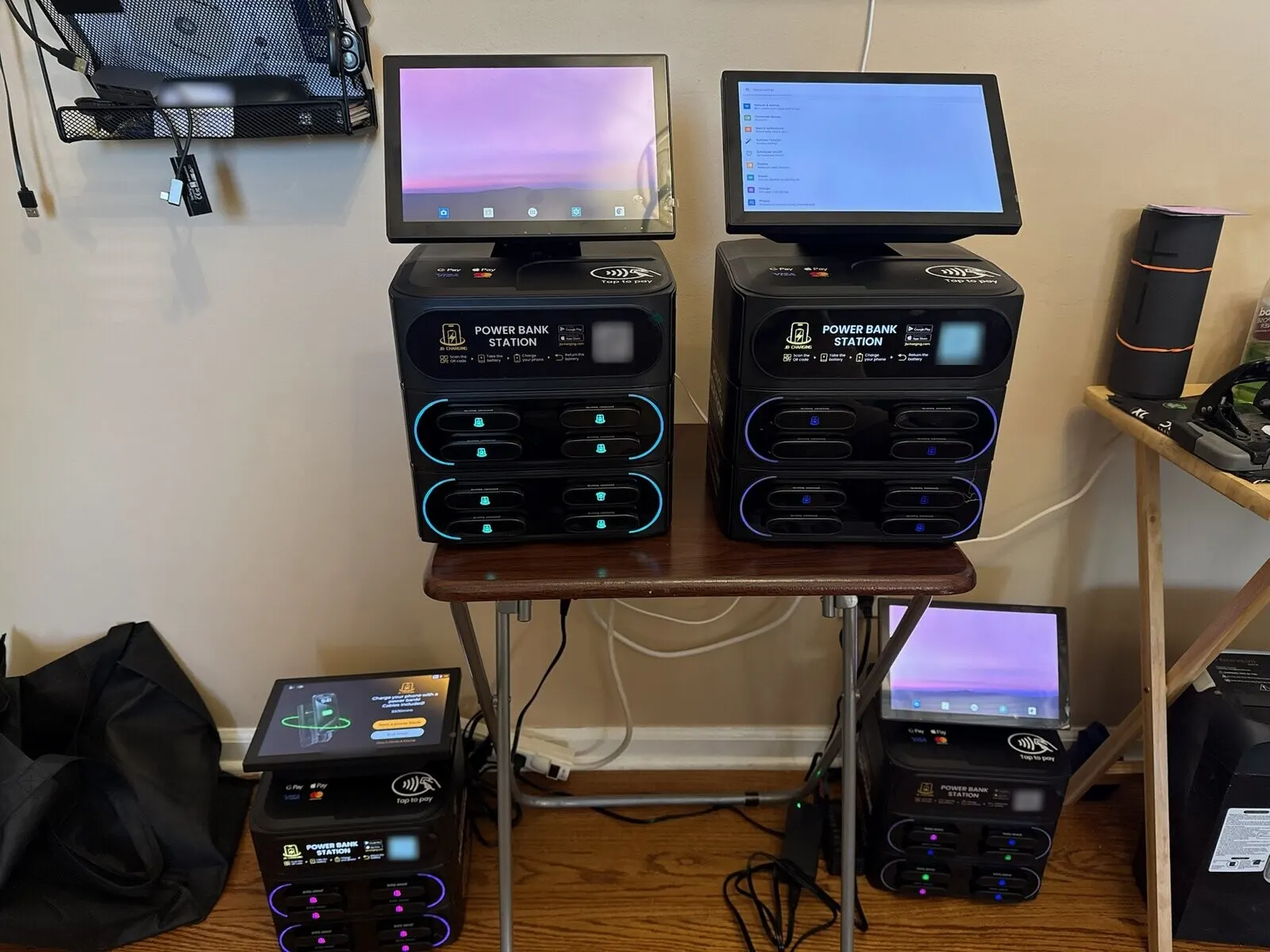
Days 3–7: set up the portal and install your first station
You'll run the business from the Distributor Portal, which installs to your phone as "JB Hub". Set up five things:
- Payout details. You're paid monthly, on the 1st, by direct deposit. Add your bank details now; statements show up in the Billing tab.
- Venues. Add each yes, send the venue agreement from the portal, and set any venue share to what you agreed in writing. This also puts the station on the app's map.
- Pricing. Set per station by the 30 minutes, hour or day, with a daily max and an optional free first period of up to 60 minutes. The default is $3 per 30 minutes with a $20 daily max; by default, a renter who keeps a bank past 24 hours pays a $40 non-return fee, and the venue never pays. For month one, we'd keep the default until a station has a few weeks of data.
- Staff code. Staff who register in the app with the station's code get a free rental each day, up to a weekly cap. Once they've rented one, they can explain it in a sentence and stop charging phones behind the bar. Mention the cap, so nobody's surprised by a charge in week two.
- Screen content. The screen shows the price and a "Rent a power bank" button; the rest is ad space you control. Upload one clean image to the portal's file spec, or give the venue a slide for its specials. Selling ads can wait.
Install first at the busiest room that said yes, not the friendliest owner, using the routine below. Its rentals and photos sell the next venue.
From then on, open JB Hub each morning and clear the Overview's "needs attention" list: offline, card reader down, low or out of charged banks, idle venue. Keeping stations online covers what each alert asks of you.
Weeks 2–3: walk-ins and installs
These two weeks are mostly selling. Calendar them like shifts:
- Two or three walk-in blocks a week at each venue's quiet hour (mid-afternoon, for bars), one venue type per block.
- Leave something behind. Owner out? Leave a brochure with your number and ask when they're usually in. The pitch guide has the follow-up email and how to run a short trial with a written end date.
Run every install the same way. Before you carry it in, the agreement has gone out from your portal and any venue share is in writing. Then:
- Pick the spot with the manager: where people wait, visible from the door, back to a wall. Restroom hallways, coat checks and entrances work well. Never on the bar, in an exit path or on an extension cord.
- Plug it into a wall outlet and confirm it's online.
- Do a test rental with the manager watching. It takes about 30 seconds and answers most of their questions.
- Register two or three staff with the staff code, and point out the four pictured steps on the station.
- Leave brochures from your bundle at the host stand or register. Pitch cards ($25 per 50, list price at the time of writing) add a rental guide for staff on the back.
- Check the portal: station assigned to the venue, pricing and venue share as agreed.
- Give the manager your number. Renters get help from us through the station, the app or their receipt, but the venue's first call should go to you.
Week 4: review every station before day 30
Most of your stations have been live a week or two. That's too soon to judge a venue, and plenty of time to find a problem you can fix. Check each venue's 7-day revenue in Venue Insights, walk each station at its busy hour, then sort it:
| On day 28, the station is | Do this | Not this |
|---|---|---|
| Still in a box | Book its install this week, or pitch the next venue on your list for it | Hold it for "the right venue" with no name and no date |
| Live under 2 weeks, few rentals | Check the header is lit, the screen faces the room and staff can point to it; rent one yourself | Move it or reprice it |
| Going dark overnight | Move it to an outlet that isn't switched off at closing, and tell the closing manager | Wait for the venue to call you |
| Low on or out of charged banks | Check Active Rentals and the non-returns card, move banks from your fullest station, leave free slots for returns | Pack every slot full |
| Live 3+ weeks, online and stocked, still flat | Start the 30-day relocation test, trying a better spot inside the venue first | Pull it after one slow week |
Say your third station went into a sports bar on day 12, and on day 26 Venue Insights shows almost nothing. Walk in on Friday night before you blame the bar. The station is on a shelf by the kitchen door where only servers pass, a stack of menus hides the lit header, and nobody on shift has heard of the staff code. That's three fixes and no move.
Before you pull a station from any venue, check the term and notice in that venue's agreement.
Last, order spare banks before you run short: $200 per 10 at list price at the time of writing. Each is rated for 500+ cycles, and a few won't come back.
Who does what: JB Charging vs you
| Area | JB Charging | You |
|---|---|---|
| Hardware | Ships the stations; reviews claims under the 3-year limited warranty | Unbox and test; report transit damage within 7 days |
| Connectivity | 4G SIM with no monthly fee, plus Wi-Fi backup | Pick spots with signal; add Wi-Fi where needed |
| Payments | Card processing; monthly payouts on the 1st | Add payout details; set prices per station |
| Software | Portal, renter app and station map, updates, venue agreement tool | Add venues, send agreements, set staff codes and screens |
| Venues | Guidance on approaching venues; pitch materials in the bundles | Find, pitch, sign and install; visit, restock and move weak stations |
| Insurance | Its own policy, which doesn't cover operators | Your own general liability, and certificates for venues |
| Screen ads | Remote upload through the portal | Find and sell advertisers and keep 100%; sales take work and aren't guaranteed |
The right-hand column is the job you're signing up for.
Next step
Planning your first order, or waiting on one? Book a call and bring the first 10 venues you'd pitch. We'll go through them with you, including which station fits each room. Current prices are on the stations page.
Examples are illustrative only, not a forecast or a typical result. What a station earns depends on the venue, placement, pricing, local demand, and how actively you run it.
Frequently Asked Questions
How much does it cost to start a phone charging station business?
At list prices at the time of writing, one J8 Pro is $1,199.99 plus $35 shipping, and the five-station Essential bundle is $4,499.95 plus $245 shipping, about $950 a station delivered, with 5 lit headers, 2 display stands and 50 brochures included. Shipping is as shown at checkout. There are no monthly fees. We keep 20% of rental revenue, which covers card processing, 4G, software and support. Budget separately for extra stands ($150 each), spare power banks ($200 per 10), your own liability insurance, gas and your time.
Do charging stations arrive ready to use?
Mostly. Each station comes with its power banks, a built-in tap-to-pay card reader and a 4G SIM at no charge. You seat the banks, plug the station into a standard outlet, confirm it's online and showing in your portal, and do a test rental. If a station won't come online, contact our team before you take it to a venue. A unit that's dead on arrival is covered by the 3-year limited warranty.
Does JB Charging's insurance cover me as an operator?
No. Our general liability policy covers JB Charging, not operators, so carry your own general liability policy. Malls, hotels, casinos, hospitals and campuses often ask for a certificate of insurance (COI) before a station goes in, so get a quote before you pitch them.
How and when do I get paid?
Monthly, on the 1st, by direct deposit. You keep 80% of rental revenue, before any venue share and your own costs, plus 100% of any screen ads you sell (you find the advertisers, and ad sales aren't guaranteed). Add your payout details in the portal early. Earnings show in real time, and statements are in the portal's Billing tab.
Who finds the venues, me or JB Charging?
You do. We give guidance on approaching venues, the bundles include pitch materials, and you send the venue agreement from the portal. Each venue decides for itself whether to host a station, and locations aren't guaranteed, so start building your venue list before your stations arrive.
Why did only part of my order arrive?
Stations, stands and headers may ship separately, so check what arrived against your order confirmation first. If something is still missing or arrived damaged, email team@jbcharging.com with your order number. Report transit damage within 7 days, with photos or video.

